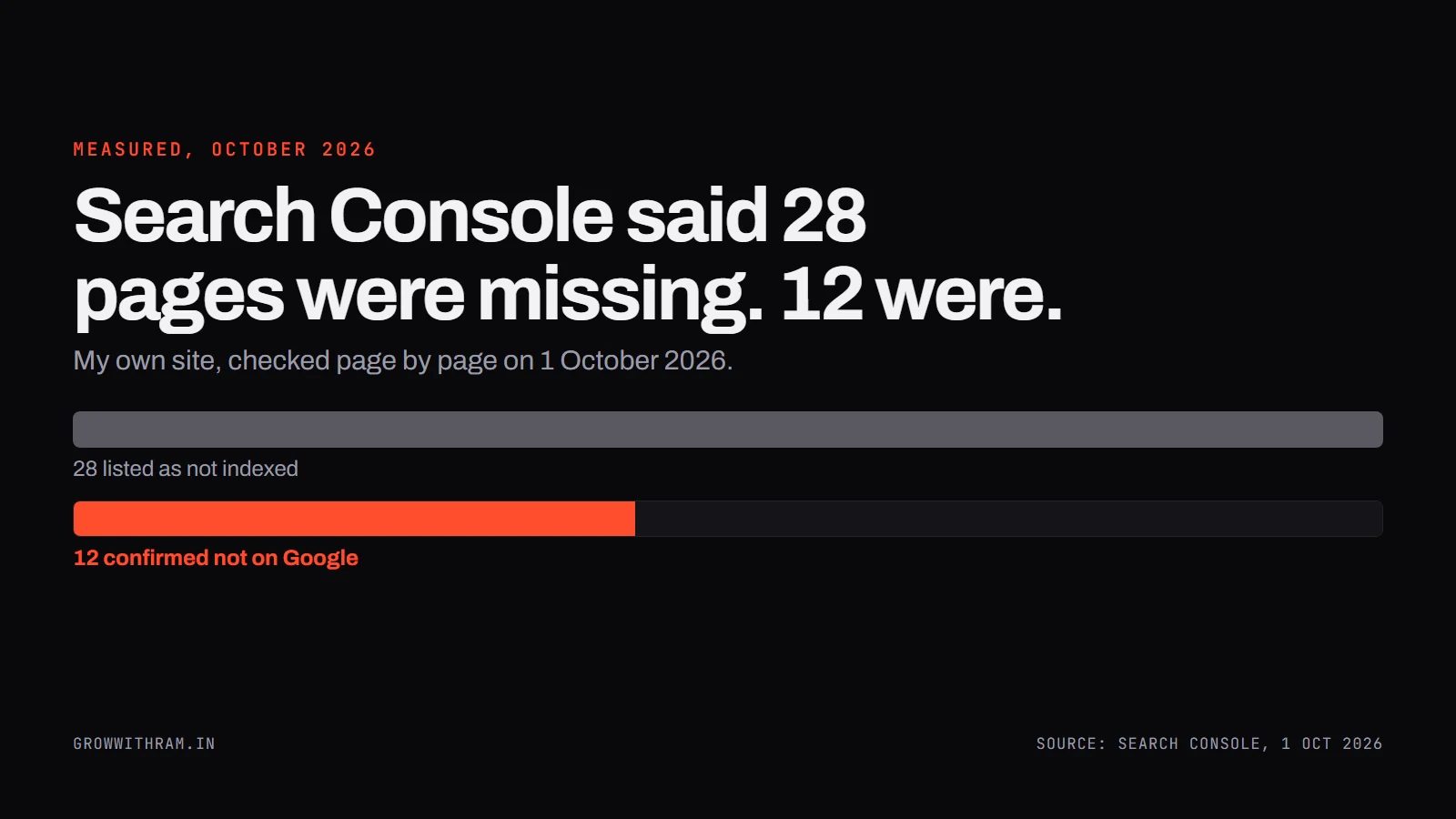
Why is my website not showing on Google? I asked that about my own site. On 1 October, Search Console told me 28 pages were not on Google. The real number was 12. Then I typed my site's name into Google, and my site was not on the first screen. Both were true, and neither meant what it looked like.
If you are asking why your website is not showing on Google, there are only a few real causes, and you can tell which one you have in about two minutes. This guide shows how, in the order I check them, with my own site as the example. It is only a few weeks old, and it ran into most of these problems.
Three different problems that all look like "not showing"
When people say their site is not showing on Google, they mean one of three things. They need different fixes, and most advice online treats them as one.
| What it is | What it means | Where you see it |
|---|---|---|
| Not indexed | Google has not stored the page, so it cannot show it | URL Inspection says "URL is not on Google" |
| Blocked | Something on your site tells Google to stay away | A noindex tag in the page, or a robots.txt rule |
| On Google, but not where you look | Google has the page and ranks it low, or shows it under a different address | URL Inspection says "URL is on Google", but searching does not find it |
"Indexed" means Google has read the page and stored it so it can be shown. A page that is not indexed cannot appear in results at all. Search Console says so itself: "Pages that aren't indexed can't be served on Google."
Step 1: Ask Google about the exact page
This takes two minutes and gives you the official answer.
- Open Search Console. It is free, and you prove you own the site once.
- Paste the full address of the page into the box at the top and press Enter.
- Read the first line of the result.
If it says "URL is on Google", the page is stored. Skip to reason 5.
If it says "URL is not on Google", the reason is written underneath. Match it to reasons 1 to 4 below.
For a rougher check with no Search Console, search site:yourdomain.com in Google. Google describes it as "a search operator that allows you to request search results from the particular domain, URL, or URL prefix specified in the operator" (site: search operator). It is a quick look. For the answer on one page, use URL Inspection.
Reason 1: Google found the page but has not read it yet
This is the most common one on a new site, and it has two almost identical labels that mean different things. Google's definitions (Page indexing report):
Discovered - currently not indexed: The page was found by Google, but not crawled yet.
Crawled - currently not indexed: The page was crawled by Google but not indexed. It may or may not be indexed in the future; no need to resubmit this URL for crawling.
"Discovered" means Google knows the address exists and has not visited. "Crawled" means Google visited and chose not to store it.
My site. The report said 28 pages were not indexed, but it was ten days out of date. By 1 October, 15 of the pages it listed had already appeared in Google results. I inspected four of those one by one and all four were indexed. The 12 pages with no results at all I inspected one by one too, and all 12 read "URL is not on Google. Discovered - currently not indexed", with no crawl date. Lesson: the report lags, so check the exact page. On 5 October I re-inspected seven of them and all seven still read the same.
Is waiting the answer? Partly. Google's own advice: "If your page or site is new, wait a few days for Google to find and crawl it. In an urgent situation, or if waiting doesn't seem to be working, you can explicitly ask Google to crawl individual pages."
Here is what I do, in order:
- Link to the page from pages that are already on Google. Google "primarily finds pages through links from other pages it already crawled" (SEO Starter Guide).
- Ask for indexing once, for pages that matter. In URL Inspection, press "Request indexing". Google warns "there's a quota for submitting individual URLs and requesting a recrawl multiple times for the same URL won't get it crawled any faster" (Ask Google to recrawl). It also says a request "does not guarantee that inclusion in search results will happen instantly or even at all."
- Get links from other sites. On 1 October, Search Console's Links report showed zero links to my site from other websites. In my judgement, that is a large part of why Google is fetching it slowly.
Reason 2: Something tells Google to stay away
Sometimes the page is blocked, and the block is yours. Two common ones.
A noindex tag. Google: "noindex is a rule set with either a meta tag or HTTP response header and is used to prevent indexing content by search engines that support the noindex rule, such as Google. When Googlebot crawls that page and extracts the tag or header, Google will drop that page entirely from Google Search results, regardless of whether other sites link to it" (noindex).
To check: open the page, press Ctrl+U, and search the source for noindex. Finding it explains everything.
I have used noindex on purpose. My interactive résumé page sends very little text to crawlers, so I keep it out of Google deliberately. I wrote up when to noindex a page. The problem is only when you did not choose it.
A robots.txt rule. Open yourdomain.com/robots.txt and read it. A rule that disallows the page's folder stops Google crawling it. One useful detail from Google: robots.txt "is used mainly to avoid overloading your site with requests; it is not a mechanism for keeping a web page out of Google" (robots.txt intro). If you want a page out of Google, noindex is the tool. And the two can fight each other: "If the page is blocked by a robots.txt file or the crawler can't access the page, the crawler will never see the noindex rule, and the page can still appear in search results" (same page as the noindex quote above).
Reason 3: Google cannot find the page
Google needs a way to reach a page before it can read it. From the same Google help page: "Google needs a way to find a page in order to crawl it. This means that it must be linked from a known page, or from a sitemap."
Two checks:
- Is the page in your sitemap? A sitemap is a list of your pages that Google reads. I submitted both of mine in Search Console's Sitemaps report, and both were read without errors.
- Is it linked from another page? On 1 October, my homepage linked to none of nine service pages that were not already in the header or footer, and most of those pages were linked from only one to three other pages. I added a services section to the homepage, links from each case study to the service it proves, and links from each teardown to the audit service. These went live on 4 October.
One honest limit: two of my waiting pages, /method and /machine, were linked from nearly every page on my site (43 of 43 and 39 of 43 pages) and were still waiting. So internal links alone were not the whole explanation. My reading, which is a judgement, is that Google fetches a site with no outside links slowly.
Reason 4: Google picked a different version of the page
Google may decide your page is a copy of another address and index that one instead. Its label: "Duplicate without user-selected canonical. This page is a duplicate of another page, although it doesn't indicate a preferred canonical page. Google has chosen the other page as the canonical for this page, and so will not serve this page in Search." In URL Inspection, the line "Google-selected canonical" shows which address Google chose.
A red label is not always a fault. Search Console flagged my site with "Page with redirect" and a "critical" HTTPS item. Both were the bare address, growwithram.in, which correctly forwards to www.growwithram.in. That is the intended setup, so I left it alone.
Reason 5: It is on Google, but not where you are looking
This is the one that surprised me, because Search Console told me the homepage was fine. On 6 October, URL Inspection said my homepage was "URL is on Google · Page is indexed". Then I searched for my own name.
| What I typed into Google (India, 6 Oct 2026) | What came first |
|---|---|
| growwithram.in | My site, first, with my About, Services and Blog pages right after it |
| growwithram | Google switched to "grow with ram" and showed a finance YouTube channel and an Instagram account with a similar name, plus stock-price pages |
| growwithram, with Google's spelling change switched off | The same channels first. My site appeared further down the first page, as my Contact page, at an address that now redirects |
Caveats: search results differ by person, place and history. This is one browser in India, and not a ranking report.
What I take from it, which is judgement and not a measured fact:
- Indexed does not mean ranked. Google has the page. It has little reason yet to put a few-weeks-old site above accounts with established audiences.
- Words that look like ordinary words get split. "Growwithram" read as "grow with ram", a phrase other accounts already own.
- Google updates old addresses slowly. My Contact page moved to the free-audit page, and Google still lists the old address.
My Search Console numbers show the same picture. Between 20 September and 4 October, the site had 6 clicks and 126 impressions, at an average position of 48.7, which is around page five. The ten searches that showed my site most were all about SEO audit services. None was my name.
If your page is indexed and you cannot see it, search for its exact title, then look at Search Console's Performance report for the searches it has actually appeared for. That tells you where it is, and it is rarely where you were checking.
A 15-minute checklist
- Paste the exact page address into URL Inspection. Write down the date and the first line.
- If it says "not on Google", read the reason underneath and match it to reasons 1 to 4.
- Open the page source (Ctrl+U) and search for
noindex. - Open
yourdomain.com/robots.txtand check that nothing blocks the page. - Check the page is in your sitemap and linked from at least one page that is already on Google.
- Press "Request indexing" once. Do not repeat it.
- If the page is on Google but you cannot find it, search its exact title and read the Performance report.
- Look again on the date you wrote down. Do not change anything in between unless you found a cause.
When it is worth getting the site checked
If those steps do not explain it, the cause may be spread across the site, such as templates, redirects or how pages are linked. I check these by hand: send me the URL and three to five verified findings come back free, each with a check you can run yourself. Get the free audit.
Frequently asked questions
Why is my website not showing on Google search?
Usually because Google has not stored the page yet, something blocks it, or it is stored but ranks too low to see. Paste the page into Search Console's URL Inspection. "URL is not on Google" means it is not stored, and the reason is listed underneath.
Why is my WordPress website not showing on Google?
Check one setting first. In WordPress, Settings → Reading has a box called "Discourage search engines from indexing this site." WordPress's own documentation says that when it is ticked, the site's pages get a noindex tag ([WordPress Reading settings](https://wordpress.org/documentation/article/settings-reading-screen/)). If you ticked it while building the site, it is easy to leave it ticked after launch.
Why is my website not showing up on Google anymore?
Inspect the page in URL Inspection first. Then look for something that changed: a noindex tag added by a plugin or update, a robots.txt rule, or addresses that moved without a redirect. Search Console also has separate reports for manual actions and security issues. Mine showed none when I checked on 1 October.
How long does Google take to index a new website?
Google does not give a number. Its guidance is "wait a few days" and then request indexing for individual pages. On my own site, which was only a few weeks old, seven of the 12 pages I re-inspected on 5 October still had not been read.
Should I request indexing for every page?
No. Google says repeated requests for the same address will not get it crawled any faster, and there is a quota. Request it once for the pages that matter, and link to the rest from pages that are already on Google.